I built this tool to make creating playblasts as simple and consistent as possible for animators.
The tool builds on Maya Capture by abstractfactory, which I used as a foundation and adapted to fit our production workflow. I developed the surrounding UI and workflow, including automatic settings, project-specific overrides, naming and versioning, and camera detection through Maya’s Camera Sequencer.
The idea was that animators should be able to open the tool and press OK without having to adjust any settings manually. The tool handles the setup in the background, while still allowing more control when needed.
Automatic Setup
The tool loads default settings from the server. Before applying them, it checks whether the current project has its own settings in a designated folder. If project-specific settings are available, these take priority over the server defaults.
This allows the tool to adapt to different projects without requiring animators to configure everything themselves.
Simple by Default
The interface opens in a minimal mode, showing only what is needed for a standard playblast. Additional settings can be expanded when a more specific setup is required.
Key Features
Automatic setup: Loads the appropriate default settings for the current project.
Project-specific settings: Uses project overrides when available, falling back to server defaults otherwise.
Automatic naming and versioning: Generates file names and finds the next available version.
Camera detection: Retrieves camera information from Maya’s Camera Sequencer.
Scene settings: Temporarily disables overscan for the playblast and restores the original value afterward.
The goal was to remove unnecessary decisions from the animator’s workflow while keeping the tool flexible enough to handle different production needs.
A tool for importing, referencing and exporting assets in Maya, with flexible options for file handling, grouping, namespaces and animation.
Import
The import tab supports both importing and referencing, choosing the appropriate method based on the file format.
Files can be grouped individually or combined into a single group, with options to reuse existing namespaces or assign unique namespaces per file.
Supported formats:
Maya ASCII (.ma)
Maya Binary (.mb)
FBX (.fbx)
OBJ (.obj)
Alembic (.abc)
Redshift Proxy (.rsProxy)
Formats that don’t support referencing are imported instead. For Redshift proxies, the tool automatically creates the proxy nodes and applies default settings.
Export
The export tab provides options for exporting selected objects or cameras, with control over file formats, animation ranges and output settings.
Selected Object Export
Selected objects can be exported as separate files or combined into a single file. Exports can be either static or animated.
For static exports, the tool uses the objects’ current state at the current timeline frame. For animation, the export range can be defined using the timeline, custom start and end frames, render settings, or individual shots from the Camera Sequencer.
Additional options include:
Baking animation before export
Adding pre-roll and post-roll frames
Setting a version number
Camera Export
A separate camera mode provides additional options for exporting cameras from the scene.
Cameras can be collected from Camera Sequencer shots, selected from all cameras in the scene, or chosen manually. The same animation and time range options available for object exports can also be used for cameras.
Automatic Versioning
The tool retrieves the user’s initials from their Windows login and uses them as part of the export naming workflow.
A utility tool for applying Redshift settings to multiple objects at once, without having to edit each object individually.
Redshift Proxy Settings
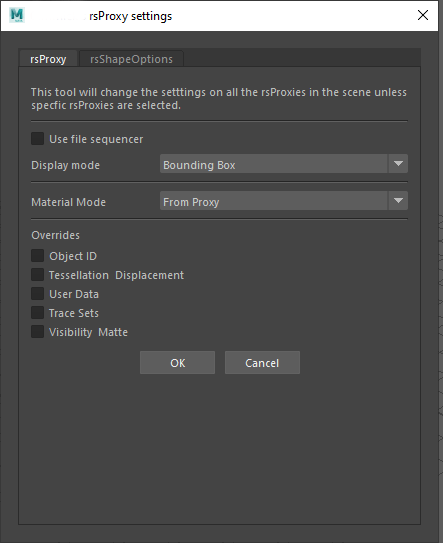
The first tab lets me change the display mode of Redshift proxies across a scene.
It can operate on selected proxies, find proxies within the current selection, or automatically find all Redshift proxies in the scene when nothing is selected. This makes it easy to switch the display mode across an entire scene in just a few clicks.
Redshift Shape Options
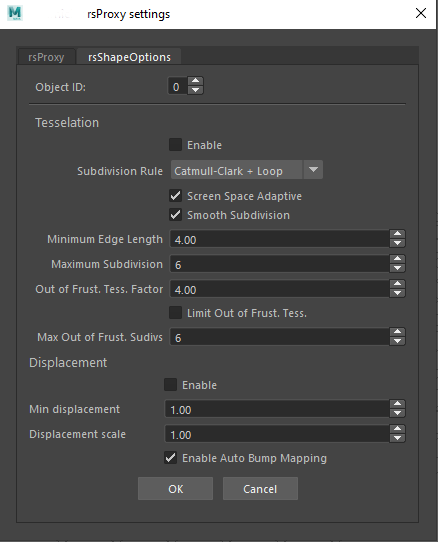
The second tab provides controls for Redshift shape attributes on selected objects.
This includes toggling tessellation and displacement, as well as adjusting their associated values across multiple objects at once.
Key Features
Shape attributes: Toggle tessellation and displacement and adjust their settings across selected objects.
Batch editing: Apply settings to multiple objects in one operation.
Flexible selection: Work with selected proxies, proxies within a selection, or all proxies in the scene.
Proxy display control: Quickly change the display mode of Redshift proxies.
Recently we were given a new challlenge from Lego. They wanted videos made in Unreal, they had a city created for a tv show that they wanted to use as the environment. We had never made anything in unreal before so after a couple of attempts to try and get some of the city out of unreal we accepted our fate. Luckily a previous colleague that had dabbled in unreal came to help us out. All the animations were still animated in maya using a rig we were also given by lego, and after a lot of trial and error we got the animations over to unreal – and that’s how these two master pieces were born.
Time is going fast, it has been a while since I posted last so I am going through and searching for some of the projects we have created during the last couple of years. There has been several cool projects, but some I have no idea where they have been posted. But this will be some highlights that I found that I don’t want to post on my portfolio, but I still find a bit fun. They are a bit old now and we have made better work since which is why I won’t post them on my portfolio page:)
In the first two videos I was reponsible for lighting, rendering and shading the products. The environment was created and shaded in houdini by my boss. We used redshift proxies to export the environments from houdini with shaders and rendered it in Maya with Redshift.
For this one I was responsible for the environment as well as lighting, rendering and shading products. I got some help of my junior for small things and we used houses mostly from an old project so we just needed to reshade the houses and build the environment. To keep the scene lighter all the houses were made into proxies and I made a small script so we could switch the visibility of all the proxies to either be visible as bounding boxes or a preview of the linked mesh. This one was created fully in Maya and rendered with Redshift.
Computer science course
To learn more about programming I decided to start a programming course recently. So far it has been fairly interesting learning about binary and how computers actually work. I am not that far ahead yet since it has been so busy in work, but here is some of the work I have done for it so far.
I couldn’t get the embeded version to work on this site, but it is a small game made within this site by connecting up nodes to learn the concept of programming before starting on the languages themselves. It was quite fun to play around with.
For my second piece of homework I created a script that creates a pyramid with the number of levels the user writes, for instance:
Height: 4
   #  #
  ##  ##
 ###  ###
####  ####
It has been a fun and challenging problem, unfortunately I can’t share the code due to the courses policy incase others want to do it later. But it is definitly a challenging course and I have already learn a lot even just bring a couple weeks in 🙂
Some of my recent works have finally been released. They have been a bit intesting to track down again as you can see from the first linked work it was posted on instagram. This Creator project was in the final stage as the Corona virus hit Danmark so the lighting I did from home with my boss who happened to luckily live close by popping over to advice and help out at times. So my responsibilities for this movie ended up being shading the lego props and the very basic environment, rigging props and applying rig to minifigures, lighting and rendering. The clouds and skies were made by someone else in Houdini and vue.
Since this was a lego set meant for 18+ we could be a bit more dramatic with the lighting and the mood of the movie which was fun. Playing with colours and the different light options to create a bit of atmospheric movie.
This movie was actually made in 16:9 format so I hope the movie in its full format shows up somewhere online eventually as well.
The following movies are a bit older, but was recently released on legos youtube channel. For these movies I mostly participated in the shading of the products and modelled and shaded the tree in Joyride. I also made a hangar for the last three movies, but unfortunately that scene was cut at the last minute.
Since this blog is now being linked with my portfolio I have realised I need to keep it a bit more professional. So if there is anyone here reading for sneaky cat pictures or personal updates then you can check out my Instagram account instead.
I am currently working on this site trying to find a good way to present my work to work on all the various screen types as well as keeping it professional and hopefully still a bit playful. So be aware that there can suddenly be changes and sometimes some non successful ones in the process of testing out what could work.
Recently I have been sitting a lot with learning python and scripting small tools for work so I am thinking about adding an additional page with some of my discoveries to help other new to scripting in Maya or for myself. I searched a lot trying to find the commands for the new rendersetup since there isn’t any documentation over it, so been trying to write up my discoveries on the way, I will try to tidy up in my notes a bit before posting it here though. Anyway since I have been sitting so much with python and scripting for the last year there has been a lack of personal projects unfortunately. Scripts are not as visually interesting at least not at my current level, but we are getting there.
Oh dear a year since last update again. Well at least now I have to try to update this site more. The site where I have had my portfolio for the last 6 years was taken down during new years so I figured I would try to gather the platforms a bit and try to make my new portfolio here. It is still a bit of a work in progress as I am fixing the descriptions on the projects and trying to search up the commercials that have been released through the year. I have almost forgotten what I have made by the time it realises, I recognise it when I see it, but it can be tricky to search them up at times. Oh, and the reason why I find them online instead of picking them up for work is because the confidentiality agreement means that it would take much longer time before my work place are allowed to release anything to me.
Anyway, here is some of the videos I have worked on this year and an older one I had apparently forgotten. Hopefully more will show up soon, when I can find them:P
I am starting here with the latest one I could find Lego Advents Calendar. There is actually 4 different versions of this one the other ones are with City, Harry Potter and Friends, but unfortunately I couldn’t find those. This one I stumbled across purely coincidentally on facebook, which was a bit extra fun to see a commercial I have helped make actually be advertised to me on there. Anyway for these ones since it was so simple animations with motion paths we created them in house so I helped animate some of them and as normal now I shaded the products. I also lighted and rendered a couple of them, even though we mostly tried to use the same light setup, it did need some tweaking for each one.
Another interesting experience last year was that I got to visit the filming set for one of the commercials with some live action elements as well. Unfortunately I can’t find the finished commercial, but still fun to see how they actually light and work in real life. So if anyone stumbles across a spiderman commercial with Hydroman from the Lego set called Hydroman Attacks tell me:)
Next project I wanted to talk about was from early in 2019 it was a ninjago project. This ended up being quite a big project particularly since my supervisor left in the middle, so more responsibility fell on me to step up more. So for both the desert commercials I ended up lighting and rendering in addition to shading all the products and exporting animation for the fx team. I also created and shaded some of the background props.
The following one I could unfortunately not find the english version of but well the animation is the same:)
So before Ninjago we had some Creator commercials again. Honestly even though they are fairly simple, I kind of like the creator projects due to how different they are and how forgiving the more cartoony style can be. Anyway the first one here is the first proper project I was solely responsible for. The environment also comes from Lego though but generally we need to adjust it quite a bit to work with the animation and changed the shaders to Redshift. But the planet I had to make myself, super advanced modelling and texturing job. The products are as always shaded by me and this commercial lighting and rendering was also done by me.
The next one here I was assissting my supervisor with again. But she was really busy at the time so I basically took over also the lighting. So I shaded environment and products, adjusted and fixed lighting and rendered it.
Lastely I stumbled across an old superhero movie I had completely forgot to post. Honestly it is not among one of my favorites. However, it definitly is a prodution I have learnt a lot from. Most of the environment we had from before, but everything needed to be reshaded to redshift shaders, and the diamond store needed to be created. It is always a bit interesting to see how little we end up seeing from the set in the end, because this was a big city with a lot of houses that I had to make the houses and pavements to proxies, but I am hoping everyone enjoys the lovely funitures I made for the inside of the jewellery store.
And to round off with a small personal update. I bought this an additional fluffball, he is a big ball of energy running around in the apartment, but Lilo and I still love him even though we both find him a bit annoying at times. I were feeling a bit guilty that Lilo was so much home alone while I was in work so now there is two of them and she has someone to play with:). but it did make it a bit more of a hassle to go home on christmas holiday with the two of them, but we managed:) and Miko (keeping up with Disney names) only tipped over the christmas tree once, before we ties it to the roof with some wireXD. Isn’t he cute??:3
I am as bad as keeping this blog up as normal:P but the latest project we worked on has finally been released so here is the new Lego City movies I worked on before christmas with Gimmick VFX. As normal I have been responsible for shading the products, and most of the environment modelling and texturing. There was a lot of issues this time with a tight deadline and some fucks up. But we/ I can just learn from it and move forward. We managed to complete it in the end and the customers were satisfied:)
Of other news that has occupied my time lately at the start of the year, January 1st actually I picked up a kitten. I have named here Lilo she is a norwegian forest cat. This is my first time getting a pet after leaving my parents house and first time having a cat at all, I am more used to dogs actually so there is a lot to get used to. But she is very nice and cuddly:) I chose a breed cat for several reasons, but main reason being then I have a professional breeders to lean upon for questions I knew she would be fully health checked and have her vaccinations etc. Plus here in Copenhagen the kittens from animal shelters sell out so quickly. I know I could have gone for an older cat and in many ways that would be easier but I kind of wanted to try to train her to walk in a harness as I live in an apartment and be able to travel with me to Norway:) Here you can see a small slideshow of how adorable she is:
This slideshow requires JavaScript.
I could go on and on about how absolutely adorable she isXD, but honestly it was probably a bit to early for me to get a pet as I am really not that stable yet. However, I don’t have any regrets it will work out in some way:) XD
So been a fairly expensive month and my apartment is slowly filling up with cat stuff, but hopefully I have gotten most of it sorted now and the biggest expenses are out of the way:) I would actually really love a second one so she wouldn’t be so much alone and had someone to play with as I have realised I am not a very good replacement for a kitten, but maybe in 6 months timeXD